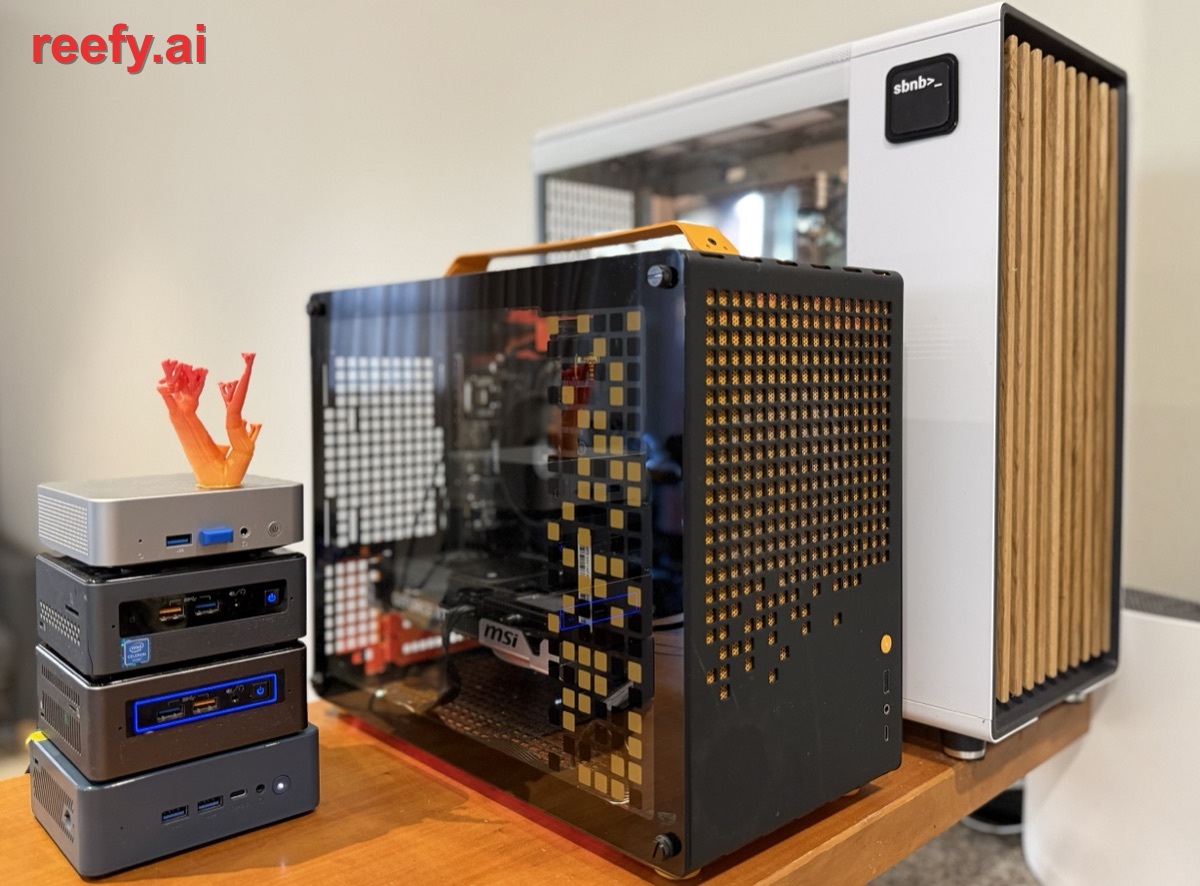
Reefy began as a solution to our own problem: a growing, diverse home lab that we wanted to run like a cloud instead of managing each machine by hand.
Setting all of that up on a regular distro like Ubuntu or Red Hat - drivers, updates, remote access, storage, backups, monitoring - is days of work even for an experienced sysadmin, and largely out of reach for everyone else. Reefy folds it all into the operating system, so any machine you own gets the cloud's operational ease.
At its core it is a Linux distribution, like Ubuntu or Red Hat, but built from first principles for one job: running AI workloads on bare metal with zero fuss - like Android for phones.
It is built entirely from source (with Buildroot): a mainline long-term-support kernel (Linux 6.18 LTS, maintained upstream into 2028), a systemd init, and a read-only SquashFS root - no package manager, no dpkg/rpm database, none of the decades of accumulated daemons and defaults nobody remembers turning on. What is left is just enough OS to bring up the hardware and start the Docker containers where your app actually lives. Reefy takes care of everything below the container - the hardware, the kernel, storage, networking, updates. Your apps run on top. ## Architecture at a glance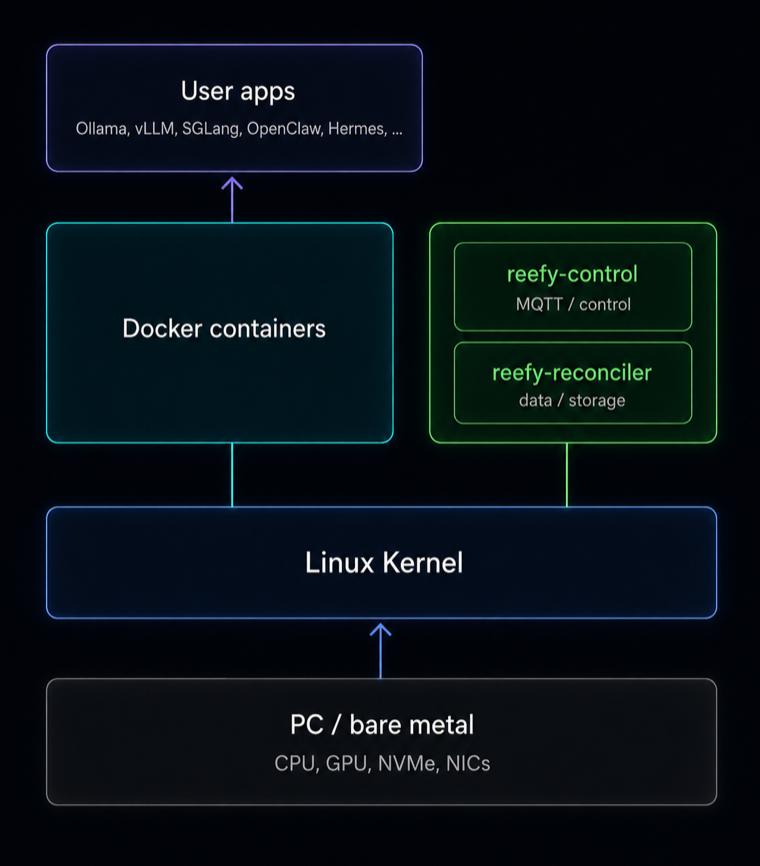 A Reefy device runs a deliberately small split of two privileged
processes:
- **Control plane** (`reefy-control`) - an MQTT-over-mTLS client. It
receives the device's desired state from the cloud and reports status
back.
- **Data plane** (`reefy-reconciler`) - owns storage (LUKS, LVM,
filesystems) and turns desired state into a running `docker compose`
stack.
The control plane is kept deliberately simple and independent, and it comes
up immediately on boot - so you can see a machine's state and control it
even when something else has gone wrong. The data plane, meanwhile, keeps
your apps running from the last-applied state if the control link drops. The
unit of truth is a single `desired-state.json`, persisted on the device and
re-applied on every boot.
The [Reefy OS security model](/docs/security-model) documents the host,
container, storage, and control-plane trust boundaries in more detail.
## How Reefy compares to other Linux distros
A traditional Linux server is a sequence of manual steps - install distro, install drivers,
configure Docker, wire up networking, expose services, set up monitoring
and backups, then babysit updates. Reefy collapses that into: flash a USB,
boot, adopt the device, start an app.
| Capability | Other distros | Reefy | Why it matters |
|:--|:--:|:--:|:--|
| OS install | ❌ | ✅ | Image any machine in minutes - nothing to set up per box |
| GPU drivers | ❌ | ✅ | GPU apps run out of the box - no driver / CUDA version hell |
| App deployment | ❌ | ✅ | Launch apps in one click instead of SSH + Docker wrangling |
| Remote access | ❌ | ✅ | Reach devices anywhere - no VPN, port-forwarding, or static IP |
| Updates | ❌ | ✅ | A bad update auto-rolls back; a remote box never bricks |
| Storage | ❌ | ✅ | Encrypted, snapshot-ready storage without the LVM / LUKS dance |
| Backups | ❌ | ✅ | Move to a new machine like restoring a phone |
| Monitoring | ❌ | ✅ | CPU / GPU / temps from first boot - no Grafana to stand up |
Here "other distros" means the usual do-it-yourself path: a general-purpose
distro where each of these is your job to install, wire up, and maintain.
The rest of this article is how Reefy delivers each of them instead.
## Managed from anywhere, including your phone
A Reefy device runs a deliberately small split of two privileged
processes:
- **Control plane** (`reefy-control`) - an MQTT-over-mTLS client. It
receives the device's desired state from the cloud and reports status
back.
- **Data plane** (`reefy-reconciler`) - owns storage (LUKS, LVM,
filesystems) and turns desired state into a running `docker compose`
stack.
The control plane is kept deliberately simple and independent, and it comes
up immediately on boot - so you can see a machine's state and control it
even when something else has gone wrong. The data plane, meanwhile, keeps
your apps running from the last-applied state if the control link drops. The
unit of truth is a single `desired-state.json`, persisted on the device and
re-applied on every boot.
The [Reefy OS security model](/docs/security-model) documents the host,
container, storage, and control-plane trust boundaries in more detail.
## How Reefy compares to other Linux distros
A traditional Linux server is a sequence of manual steps - install distro, install drivers,
configure Docker, wire up networking, expose services, set up monitoring
and backups, then babysit updates. Reefy collapses that into: flash a USB,
boot, adopt the device, start an app.
| Capability | Other distros | Reefy | Why it matters |
|:--|:--:|:--:|:--|
| OS install | ❌ | ✅ | Image any machine in minutes - nothing to set up per box |
| GPU drivers | ❌ | ✅ | GPU apps run out of the box - no driver / CUDA version hell |
| App deployment | ❌ | ✅ | Launch apps in one click instead of SSH + Docker wrangling |
| Remote access | ❌ | ✅ | Reach devices anywhere - no VPN, port-forwarding, or static IP |
| Updates | ❌ | ✅ | A bad update auto-rolls back; a remote box never bricks |
| Storage | ❌ | ✅ | Encrypted, snapshot-ready storage without the LVM / LUKS dance |
| Backups | ❌ | ✅ | Move to a new machine like restoring a phone |
| Monitoring | ❌ | ✅ | CPU / GPU / temps from first boot - no Grafana to stand up |
Here "other distros" means the usual do-it-yourself path: a general-purpose
distro where each of these is your job to install, wire up, and maintain.
The rest of this article is how Reefy delivers each of them instead.
## Managed from anywhere, including your phone
Every Reefy device is managed from a web dashboard at reefy.ai - cloud-hosted, so it is always reachable and shows your whole fleet even when a device itself is offline.
The transport is MQTT, not a custom agent protocol. Browsers connect directly over **MQTT-over-WebSocket (WSS)** using a short-lived JWT minted per session, so the dashboard gets the same real-time device stream the backend does - status, metrics, and app lifecycle events arrive as they happen. Remote shells and app web UIs ride **Cloudflare named tunnels** (`cloudflared` on the device), so you reach a box at `Remote management is a convenience, not a dependency.
Because the reconciler persists `desired-state.json` and the apps' container images locally, a device boots and brings its entire stack back up from local images - no network required. MQTT connects asynchronously afterward; apps never wait on the cloud to start. Saved network configuration (including static IPs) is re-applied on boot by the same reconcile path. The result is a device that runs unattended in fully offline or air-gapped environments, and simply syncs with the dashboard - including firmware (OS) upgrades - whenever it can reach it. On the local network the device needs no cloud at all to reach: it advertises itself over mDNS as `Reefy boots through a Unified Kernel Image (UKI) - the entire OS packed into a single EFI binary.
The kernel, initramfs, kernel command line, and OS-release metadata are bundled into that one binary via systemd's `linuxx64.efi.stub`. One file, assembled with `objcopy`, is the entire bootable OS. This removes the fragile multi-file bootloader-plus-config setups that plague traditional distros and gives a clean, measurable boot artifact. Build flavors (production vs. a verbose dev shell) differ only in the baked-in `.cmdline` section; the kernel and rootfs are identical. Bundling the whole OS into one EFI binary also makes it the natural unit for **Secure Boot**: there is a single artifact to sign and measure rather than a kernel, initramfs, and command line that each need covering independently. The image is signing-ready, so hardening the boot chain further - signed UKIs with enrolled keys, and TPM-measured boot - is a direct path from here rather than a re-architecture. ## Boot and run from a USB dongleReefy boots and runs from a USB stick - a surprisingly optimal way to run bare metal, though it runs just as well flashed to an internal drive.
The dongle has real upsides. It carries a GPT layout of two EFI System Partitions (the A/B slots, `reefy-a` / `reefy-b`) and a tiny raw key partition (a data partition is added only when a device is adopted to run entirely from the dongle). Because the OS lives on the stick, the machine's internal NVMe/SSD is left entirely for your encrypted data, the OS is trivially portable between machines, and re-imaging or recovering a box is as simple as swapping a stick.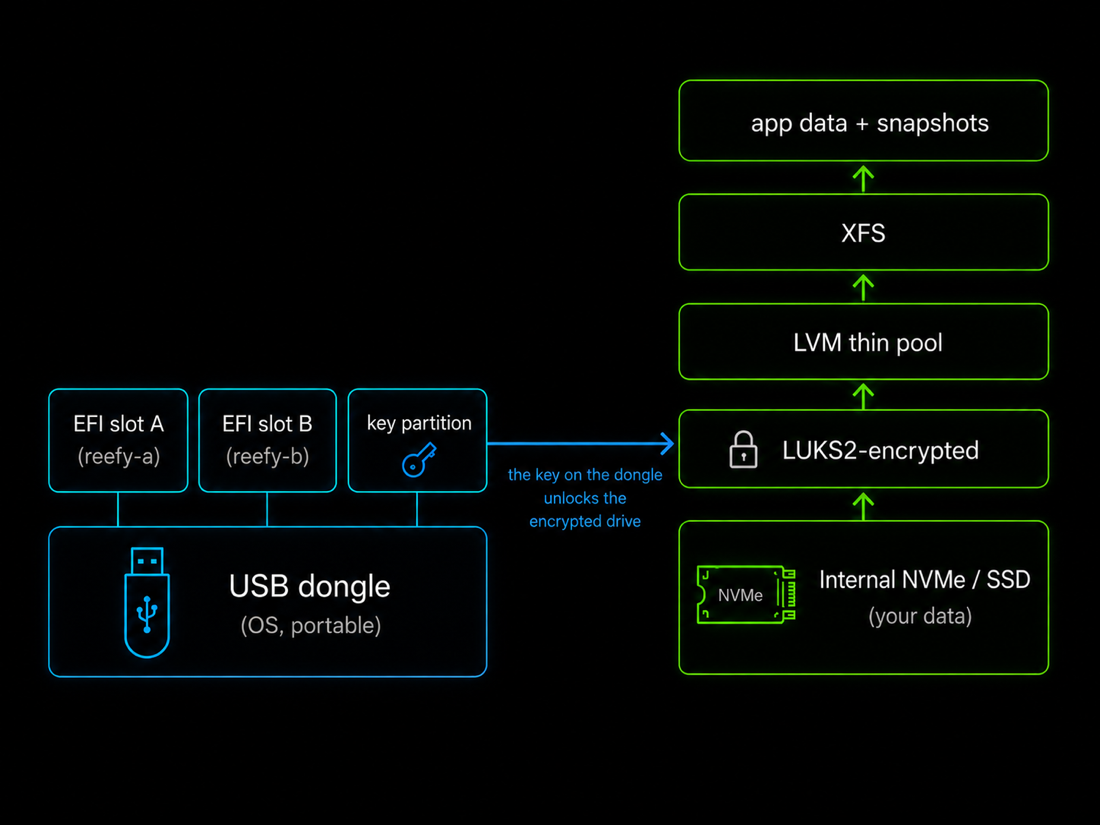 ## A/B updates, like mission-critical hardware
OS updates use an A/B slot scheme - the new OS goes to the spare slot, is tried, and rolls back automatically if it misbehaves.
The `reefy-efi` updater fully recreates the *inactive* slot - it is reformatted from scratch on every update, so any residual filesystem damage on that partition is wiped and recovered automatically - then writes the new UKI there and sets the UEFI `BootNext` variable as a one-shot to try it. The safety net is health-gated, not blind: after a switched boot, the system waits for storage and the control plane to actually come up healthy and only then commits the new slot to `BootOrder`. If they do not, the machine reboots and UEFI falls straight back to the previous, known-good slot. There is a second, lower-level net too: a hardware watchdog (pinged by systemd through `/dev/watchdog`) is armed across the update, so even if the new kernel hangs completely - never even reaching the health check - the watchdog resets the box and UEFI falls back. The system is designed so that a failed update should not brick the machine. This approach was inspired by the fault-tolerant update systems used in projects like SpaceX's Starlink satellites, where a failed remote update simply is not an option. For the curious, [Starlink's paper on over-the-air updates](https://digitalcommons.usu.edu/cgi/viewcontent.cgi?article=5598&context=smallsat) covers the same problem at the scale of thousands of satellites - over the vacuum, in their case.
User data encryption is on from first boot - not an option you remember to enable.
Data partitions are **LUKS2** with **AES-256-XTS**, and when a device runs from a dongle the encryption key lives on the dongle itself. That has an unexpected upside: pull the stick - and with it the key - and the internal drives are unreadable ciphertext. There is no wipe step and no waiting - a machine can be safely handed to another owner, returned, or decommissioned the moment the dongle is removed. See the [Reefy OS security model](/docs/security-model) for the guarantees and limits of encryption at rest, immutable firmware, and recoverable A/B updates. ## A storage stack tuned for AI data and backupsOn internal drives the data path is LUKS2 -> LVM thin pool -> XFS - encrypted, with instant snapshots for backups.
A single volume group (`reefy`) hosts a thin pool (`reefy_pool`) from which per-app thin volumes are carved. Thin provisioning gives us instant, space-efficient **snapshots**, which is exactly what makes consistent backups possible without taking apps offline. Two choices in that stack come straight from benchmarking rather than folklore: - **XFS over ext4**, to avoid ext4's inode tax - tens of gigabytes of inode tables pre-allocated on a large pool, versus near-zero for XFS. - **A 512 KiB thin-pool chunk size**, for far better space reclaim under fragmented deletes (XFS reclaimed ~73% of freed space at 512 KiB versus ~7% at 4 MiB), at no throughput cost. We benchmarked the stack on one of the fastest NVMe drives available (a PCIe 4.0 Samsung 990 EVO Plus, rated 7.25 / 6.3 GB/s) and confirmed that sequential read and write are essentially unaffected by the encryption + LVM + XFS layers. Full methodology and numbers are in the [storage benchmark study](https://github.com/reefyai/reefy/blob/main/docs/storage-chunk-size-study.md). ## Cloud backup and painless migrationReefy backs selected app-data folders up to the cloud with Borg - deduplicated and encrypted before they leave the device.
It uses one encrypted repository per user and per-instance append-only SSH keys for access control. The reconciler takes an LVM thin snapshot first, so the archive is point-in-time consistent even while the app keeps writing. The payoff is that moving to a new machine feels like migrating to a new iPhone: bring up a fresh Reefy box, point an app instance at an existing archive, and the reconciler runs the restore as part of applying desired state. Your app comes back with the same data and state. Hardware becomes disposable; your setup does not - so a failed machine is replaced in minutes rather than painstakingly recovered. That matters most with consumer-grade hardware and across larger fleets, where something is always failing somewhere. ## GPUs that just workNvidia support is built into the OS - drivers, CUDA, and firmware ship in the image.
Reefy tracks the latest stable drivers: the GPU kernel module, GSP firmware, and CUDA userspace all ship in the build. At boot, Reefy generates a **Container Device Interface (CDI)** spec for the GPU - the modern way to expose accelerators to containers, which replaces the older Nvidia container runtime. Apps do not deal with any of this. An app simply declares that it wants a GPU, and Reefy attaches the device, libraries, and mounts automatically whenever the machine has one. No driver-version roulette, no manual runtime surgery. ## Built-in monitoring, from the first bootMonitoring in the spirit of Grafana, there the instant you boot - nothing to install or wire up.
Devices push metrics over MQTT (Prometheus-style `reefy_*` names with labels - so disk and network are reported per-mount and per-interface); the backend ingests them into a **TimescaleDB** time-series store, with rollups that keep multi-day dashboard queries fast. CPU, GPU, memory, disk, network, **fan speeds, and temperatures** are all visible immediately. For custom-built PCs the fan and temperature series are genuinely useful for judging how well your cooling actually holds up under load - and the one-click **Bench** app (sysbench, fio, gpu-fryer) lets you put the hardware under that load on purpose. ## Estimated cloud savingsReefy turns the hardware you already own into a number you can point at.
The dashboard continuously estimates what the same machine would cost as a cloud VPS and accumulates the savings against its actual uptime. The estimate is grounded: your CPU, RAM, and disk are matched to median VPS pricing across major providers (rounded *down* to stay conservative), and every online hour credits its share. The running total is exactly what you are *not* paying a cloud. ## The App CatalogA catalog of popular open-source apps that install in one click - and you can package and publish your own.
Reefy's catalog spans inference servers, AI agents, dev environments, and media and home apps. Either way, the hard parts of bare metal (boot, storage, encryption, GPUs, networking, updates) are already solved underneath, so an app is just a container plus a manifest. Starting one is a single click: the dashboard turns the app's manifest into a container service - storage carved from the thin pool, environment injected, GPU attached when present, and a public HTTPS route provisioned - and pushes it to the device to bring up. That public route is a feature in itself. Every app you start is reachable from anywhere instantly: its ports are published through a Cloudflare named tunnel, so there is no port forwarding, no firewall holes, and no public IP - the app is fronted at a `*.reefy.ai` URL with TLS and short-lived access tokens. Think of it like Tailscale Funnel for exposing a service port, except it works out of the box with zero setup. A few examples from the catalog: - **Inference servers - Ollama, vLLM, SGLang.** Because the Nvidia stack is wired all the way through to CDI, these run on the GPU with no setup. - **AI agents - OpenClaw and Hermes.** Same one-click start. And because Reefy backs up app data, your agent comes back exactly the same on another machine. - **And much more** - Frigate (video / NVR), Gitea, code-server, full Ubuntu and Fedora dev environments, and others. ## Development environmentsUbuntu and Fedora dev environments are full distros - first-class Reefy apps you can run several at once on one box.
Each is a full, real distro - systemd and all - with full access to the host hardware, including KVM, so you can spin up virtual machines inside them. That means several independent Ubuntu or Fedora environments can run on a single Reefy PC at once - genuinely handy for development and experimentation. ## A unified LLM proxy and routerReefy includes an OpenAI-compatible LLM gateway that owns provider credentials and token refresh, so your apps don't have to.
Reefy includes this proxy and router out of the box (`reefy-llm-proxy`). It owns provider credentials and the OAuth token-refresh lifecycle, so individual apps stop reinventing that plumbing: they point `OPENAI_BASE_URL` at the local proxy, use a standard OpenAI client, and let Reefy handle refresh and routing. Credentials stay on the device and are never synced back to the cloud. More detail in the [reefy-llm-proxy repo](https://github.com/reefyai/reefy-llm-proxy). ## Liveness monitoring and alertsReefy watches every device and emails you the moment one drops offline - or comes back.
Device up/down is detected through MQTT's **Last-Will-Testament**: when a device's connection drops, the broker publishes its offline status, the backend marks it down and emails the admin (with a stale-online scrub as defense in depth, and a back-online email when it returns). You always know the state of your fleet without watching it. ## What hardware is supported?Just about any x86-64 machine today, with ARM on the roadmap.
Reefy is deliberately agnostic to hardware configuration: the same image boots a 2-core Celeron with 4 GB of RAM and a 128-core datacenter server, and scales the storage, GPU, and app stack to whatever it finds. A mini-PC, an old laptop, a custom build, a rack server - they all run Reefy. ## We're at the beginningAI computers today are where smartphones were around 2003 - the platform is just forming, and the OS for it is still being created.
Android turned commodity hardware into a phone platform, and the market went from tens of millions of units to roughly a billion within a decade. AI computers are at that same early inflection - and Reefy is here to power them.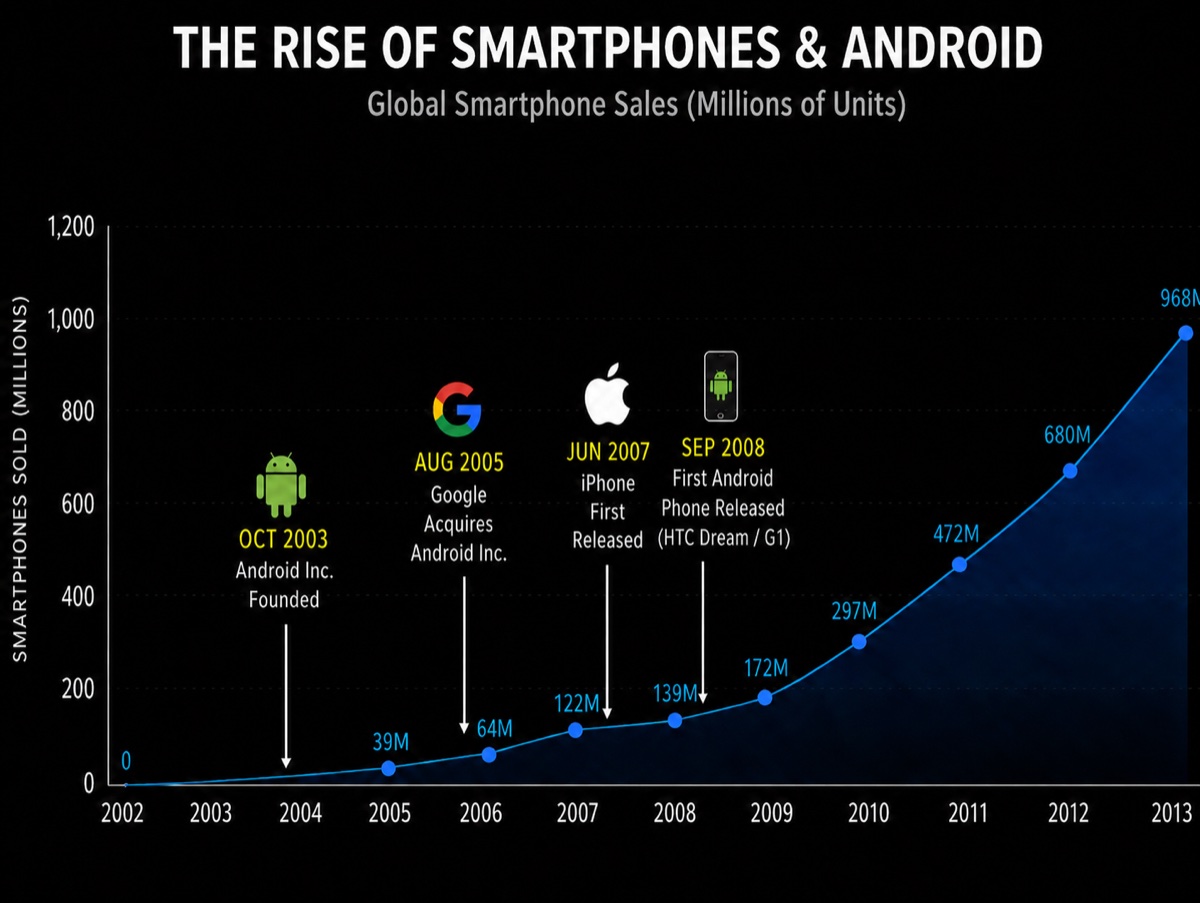
Reefy is a new concept, like the cloud - but on hardware you own.