30502788673c.
We measured maximum performance and power consumption of the Intel integrated GPU and Intel AI Boost NPU in an Intel Core Ultra 7 256V system, then compared them with an Nvidia GeForce RTX 5060 Ti GPU. The task is a fully hardware-accelerated video stream pipeline: H.264 decode, preprocessing, and YOLO-NAS object detection.
In our results, the Intel iGPU delivered 4.8x better FPS/W than the Nvidia GPU, while the Intel NPU delivered 11.1x better FPS/W. This makes the Intel NPU the best fit among the tested devices for power-efficient AI applications that target video understanding.
Benchmark Task
The benchmark takes raw camera video frames and runs object detection on them.
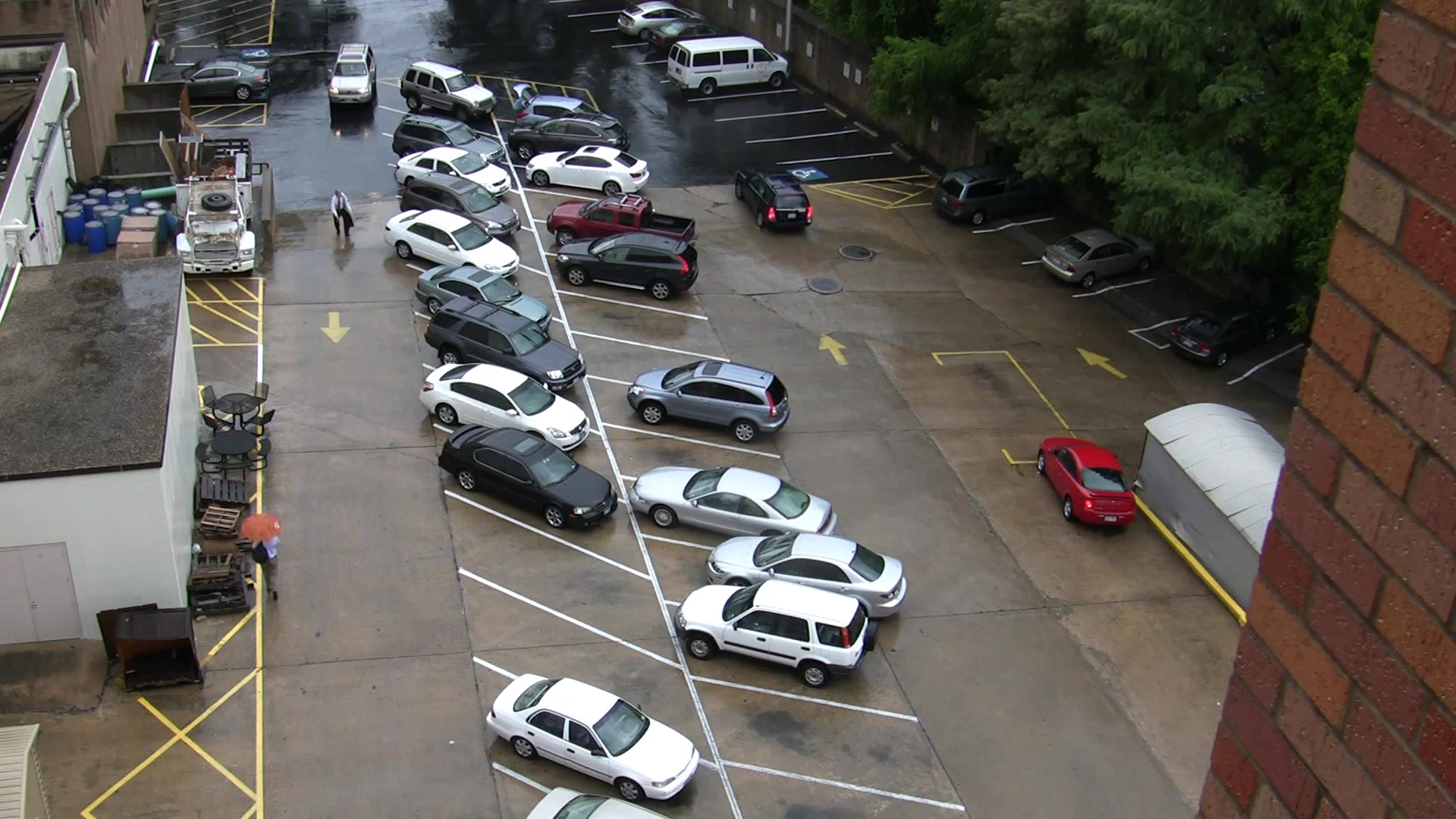
Source video frame.
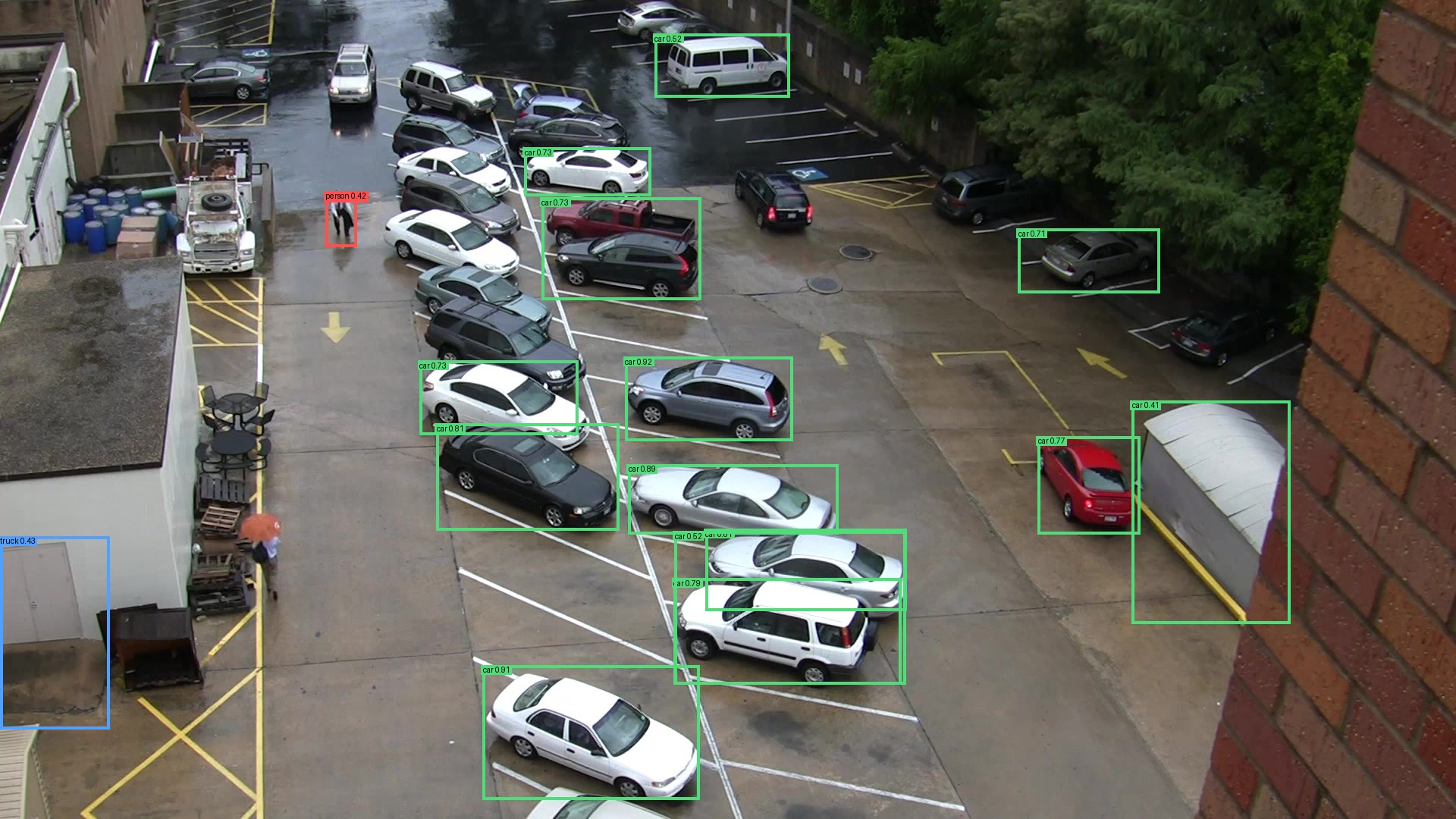
Object detections produced by the YOLO-NAS model.
Core Pipeline
- Decode a video file as fast as possible.
- Resize and convert frames to the model input format.
- Run YOLO-NAS object detection.
- Count detections and collect latency, CPU, GPU, and power telemetry.
Sample Video Clip
We used VIRAT_S_050203_07_001288_001531.mp4, a public CCTV clip from the VIRAT Video Dataset. It is a VIRAT Release 2.0 stationary surveillance clip: 1920x1080, H.264, yuv420p, 30000/1001 FPS, 242.94s, 310.9 MB.
Model
We used a YOLO-NAS
small object-detection model exported to
models/yolo_nas_s.onnx, with COCO labels from
labels/coco-80.txt. The model input is uint8 NCHW
[1, 3, 320, 320].
Hardware Configurations
Intel Core Ultra 7 256V System
Observed from OpenVINO inside the benchmark container:
OpenVINO: 2025.3.0
CPU: Intel(R) Core(TM) Ultra 7 256V
GPU: Intel(R) Graphics [0x64a0] (iGPU)
NPU: Intel(R) AI Boost
Process node: Lunar Lake's compute tile, which contains the CPU cores, iGPU, and NPU, is reported as TSMC N3B, a 3 nm-class process; the platform controller tile is TSMC N6, a 6 nm-class process (source).
Host NPU proof:
/dev/accel/accel0 exists
/sys/class/accel/accel0 exists
intel_vpu kernel module loaded
Wall power was measured with no other payload containers running:
idle: 4.3 W
NPU benchmark load: 14.8 W
Nvidia RTX 5060 Ti System
Observed from the host:
CPU: AMD Ryzen 5 5600X 6-Core Processor
Observed from nvidia-smi:
GPU: NVIDIA GeForce RTX 5060 Ti
driver: 595.45.04
CUDA reported by driver: 13.2
Process node: Nvidia GeForce RTX 50-series GPUs are reported as TSMC 4N, a custom 5 nm-class process (source).
Benchmark container:
nvidia/cuda:12.6.3-cudnn-runtime-ubuntu24.04
ONNX Runtime GPU: 1.22.0
CUDAExecutionProvider
Wall power was measured with no other payload containers running:
idle: 48.2 W
Nvidia benchmark load: 178.0 W
OS
Both systems booted into the Reefy.ai Linux distribution
with kernel 6.18.36.
CPU Governor Settings
All published benchmark runs used the default CPU power policy:
scaling_governor: powersave
energy_performance_preference: balance_performance
Physical Setup
Wall power was measured with plug-in wall meters while no unrelated payloads were running. The idle readings below are the baselines used for FPS/W calculations.
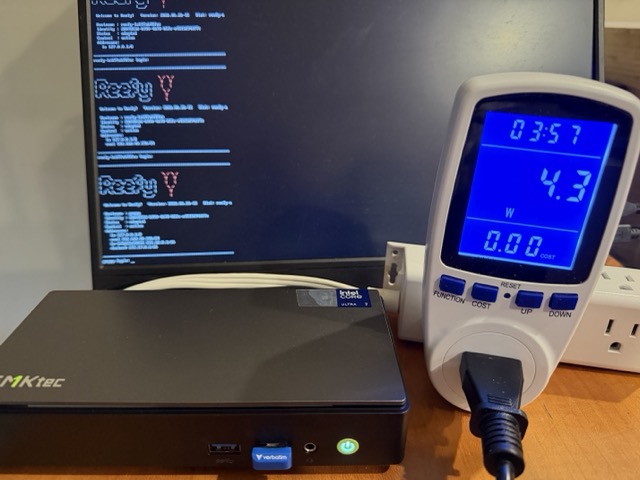
Intel Core Ultra system idle baseline: 4.3 W.
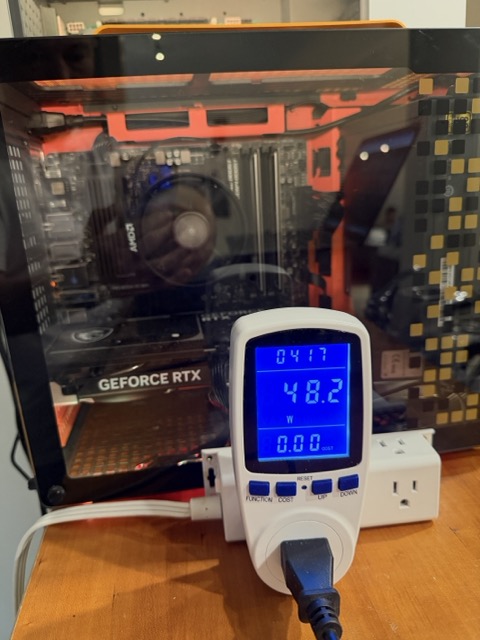
Nvidia RTX 5060 Ti system idle baseline: 48.2 W.
Pipelines And How To Run
Nvidia GPU
H.264 file -> FFmpeg CUDA decode -> scale=320:320,format=bgr24
-> Python frame reader -> ONNX Runtime CUDA -> YOLO-NAS output parser
Run:
docker build --target nvidia -t reefy-video-ai-bench:nvidia .

docker run --rm --device nvidia.com/gpu=all \
  -v "$PWD/samples:/videos:ro" \
  -v "$PWD/results:/results" \
  reefy-video-ai-bench:nvidia \
  --video /videos/VIRAT_S_050203_07_001288_001531.mp4 \
  --backend onnx-cuda \
  --decoder cuda \
  --pipeline baseline \
  --require-hw-decoder \
  --loops 11 \
  --out /results/VIRAT_S_050203_07_001288_001531-nvidia-rtx5060ti-default-11loops.json
If your Docker host uses the older Nvidia runtime instead of CDI, replace
--device nvidia.com/gpu=all with --gpus all.
Intel iGPU
H.264 file -> FFmpeg VAAPI decode -> scale=320:320,format=bgr24
-> Python frame reader -> OpenVINO GPU -> YOLO-NAS output parser
Run:
docker build --target intel -t reefy-video-ai-bench:intel .

docker run --rm \
  --device /dev/dri \
  --privileged \
  -v /sys:/sys:ro \
  -v "$PWD/samples:/videos:ro" \
  -v "$PWD/results:/results" \
  reefy-video-ai-bench:intel \
  --video /videos/VIRAT_S_050203_07_001288_001531.mp4 \
  --backend openvino-gpu \
  --decoder vaapi \
  --pipeline baseline \
  --require-hw-decoder \
  --loops 3 \
  --out /results/virat-intel-igpu-baseline.json
Intel NPU
H.264 file -> FFmpeg VAAPI decode -> scale=320:320,format=bgr24
-> Python frame reader -> OpenVINO NPU -> YOLO-NAS output parser
The Intel NPU runs the YOLO-NAS inference graph through OpenVINO, accelerating supported tensor operations on dedicated low-power AI hardware. Video decode and frame preparation happen outside the NPU.
Run:
docker build --target intel-npu -t reefy-video-ai-bench:intel-npu .

docker run --rm \
  --device /dev/dri \
  --device /dev/accel/accel0 \
  --privileged \
  -v /sys:/sys:ro \
  -v "$PWD/samples:/videos:ro" \
  -v "$PWD/results:/results" \
  reefy-video-ai-bench:intel-npu \
  --video /videos/VIRAT_S_050203_07_001288_001531.mp4 \
  --backend openvino-npu \
  --decoder vaapi \
  --pipeline baseline \
  --require-hw-decoder \
  --loops 11 \
  --out /results/virat-intel-npu-default-10min.json
The --loops 11 run lasts about 10 minutes on the Intel NPU and is useful for
stable wall-power and dashboard screenshots.
Power Measurement
FPS/W means frames processed per watt consumed.
We use wall power for the final FPS/W numbers because it captures the full
system cost: accelerator, CPU, memory, storage, motherboard, PSU losses, and
all other platform overhead. We also collect software-reported power metrics,
such as Intel RAPL and nvidia-smi, and show them in the Reefy metrics graphs.
Those software metrics are useful for understanding where power goes inside
the machine, but they are lower than wall power because they do not include the
entire platform or power-supply losses.
Results
Efficiency
| Device path | Max FPS | FPS/W |
|---|---|---|
| Nvidia RTX 5060 Ti system | 143.8 | 0.81 |
| Intel Core Ultra iGPU | 96.6 | 3.85 |
| Intel Core Ultra NPU | 133.2 | 9.00 |
Relative Efficiency
| Device path | Relative FPS/W |
|---|---|
| Nvidia RTX 5060 Ti system | 1.0x |
| Intel Core Ultra iGPU | 4.8x |
| Intel Core Ultra NPU | 11.1x |
Electricity Cost
CCTV and video-understanding workloads usually run 24/7/365. Using the U.S. Energy Information Administration April 2026 U.S. average residential electricity price of 18.83 cents/kWh, the measured wall-load power translates to:
| Device path | Wall load | kWh/year | Cost/year |
|---|---|---|---|
| Nvidia RTX 5060 Ti system | 178.0 W | 1,559.3 | $294 |
| Intel Core Ultra iGPU | 25.1 W | 219.9 | $41 |
| Intel Core Ultra NPU | 14.8 W | 129.6 | $24 |
Compared with the Nvidia GPU system, the Intel NPU system saves about $269 per year in electricity for one always-on video AI workload.
Reefy Metrics Screenshots
Both benchmark machines were booted into Reefy OS and connected to reefy.ai. The graphs below come from Reefy's built-in monitoring dashboard, which works out of the box for device metrics such as accelerator utilization, power, temperatures, and fans.
Nvidia RTX 5060 Ti
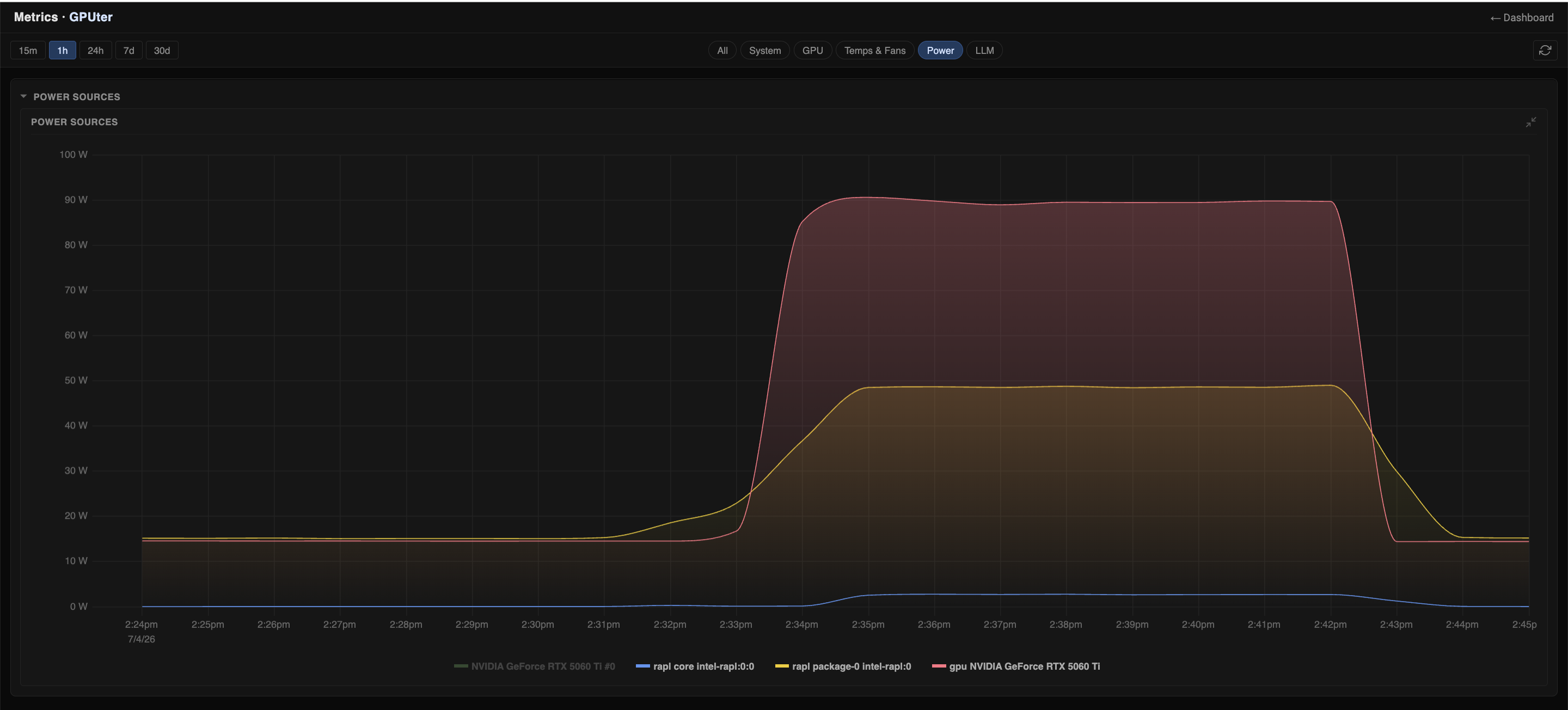
Software-reported power consumption.
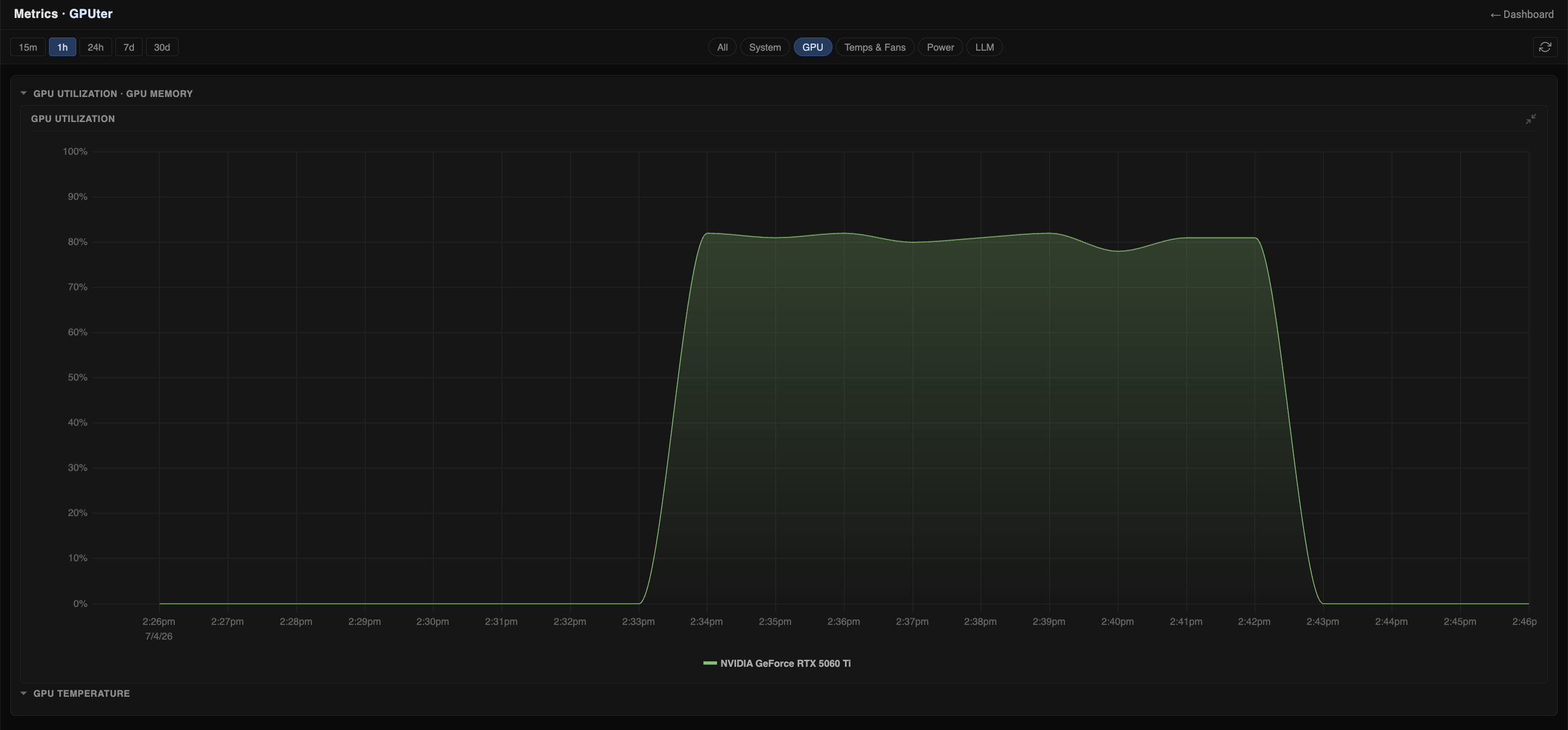
GPU utilization.
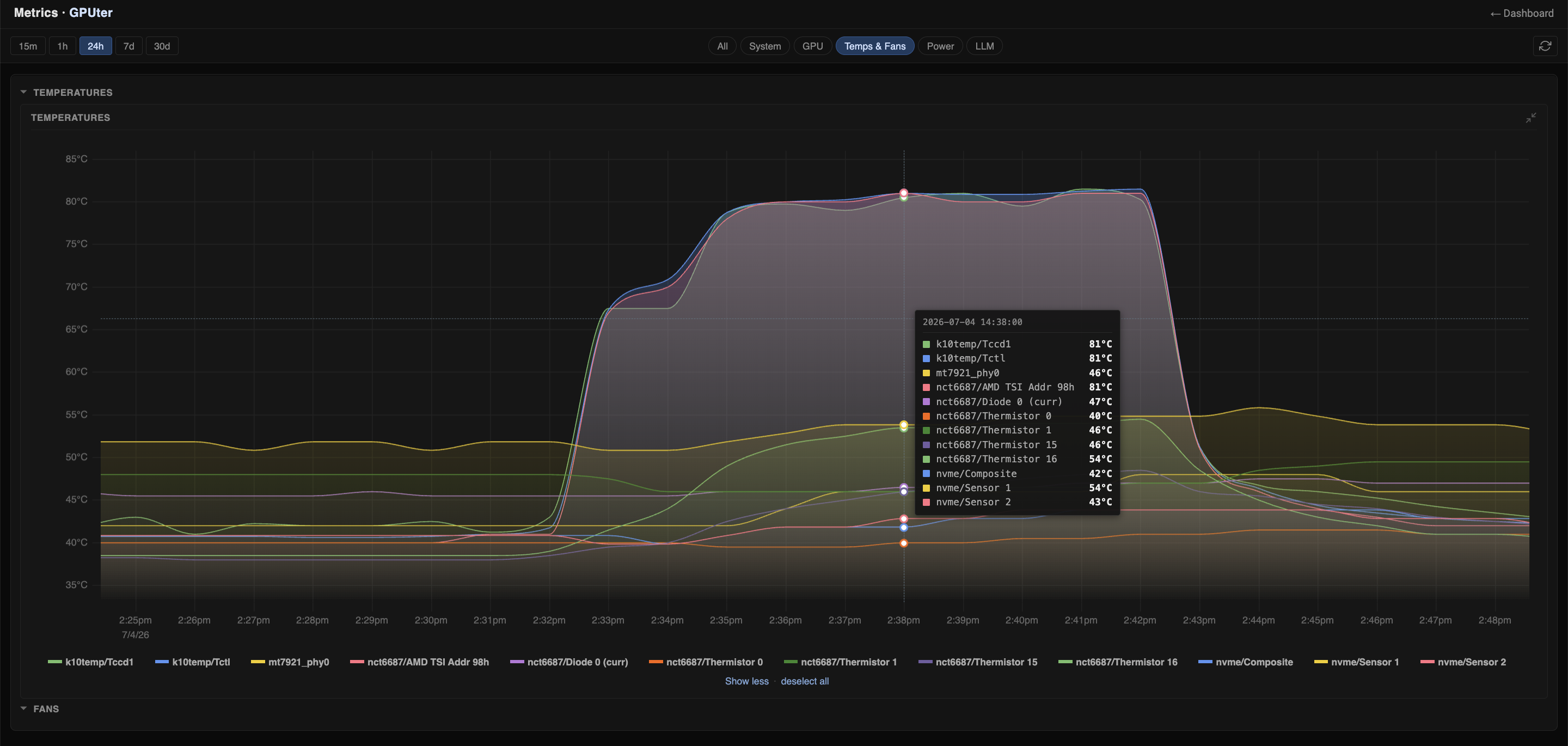
Temperature.
Intel Core Ultra iGPU
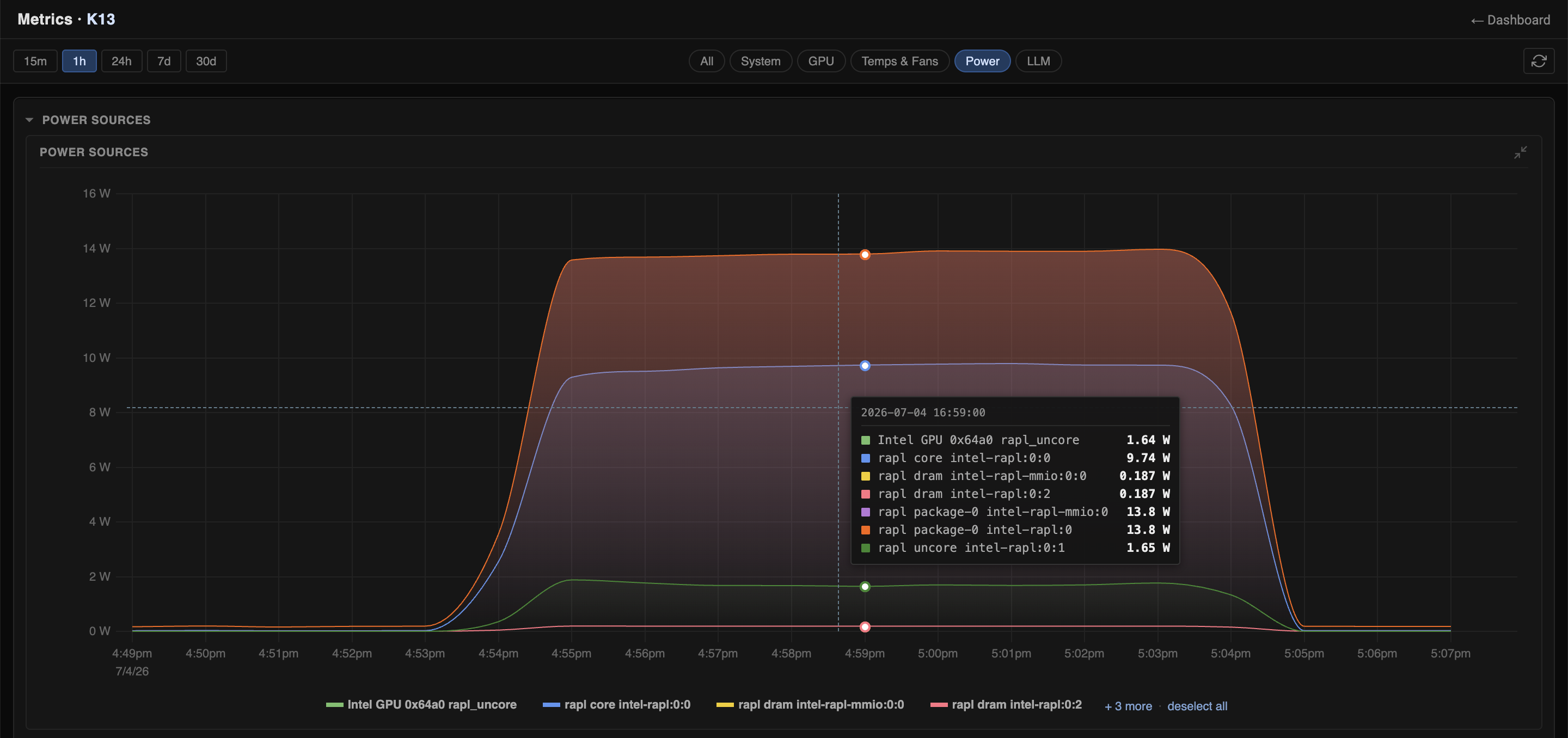
Software-reported power consumption.
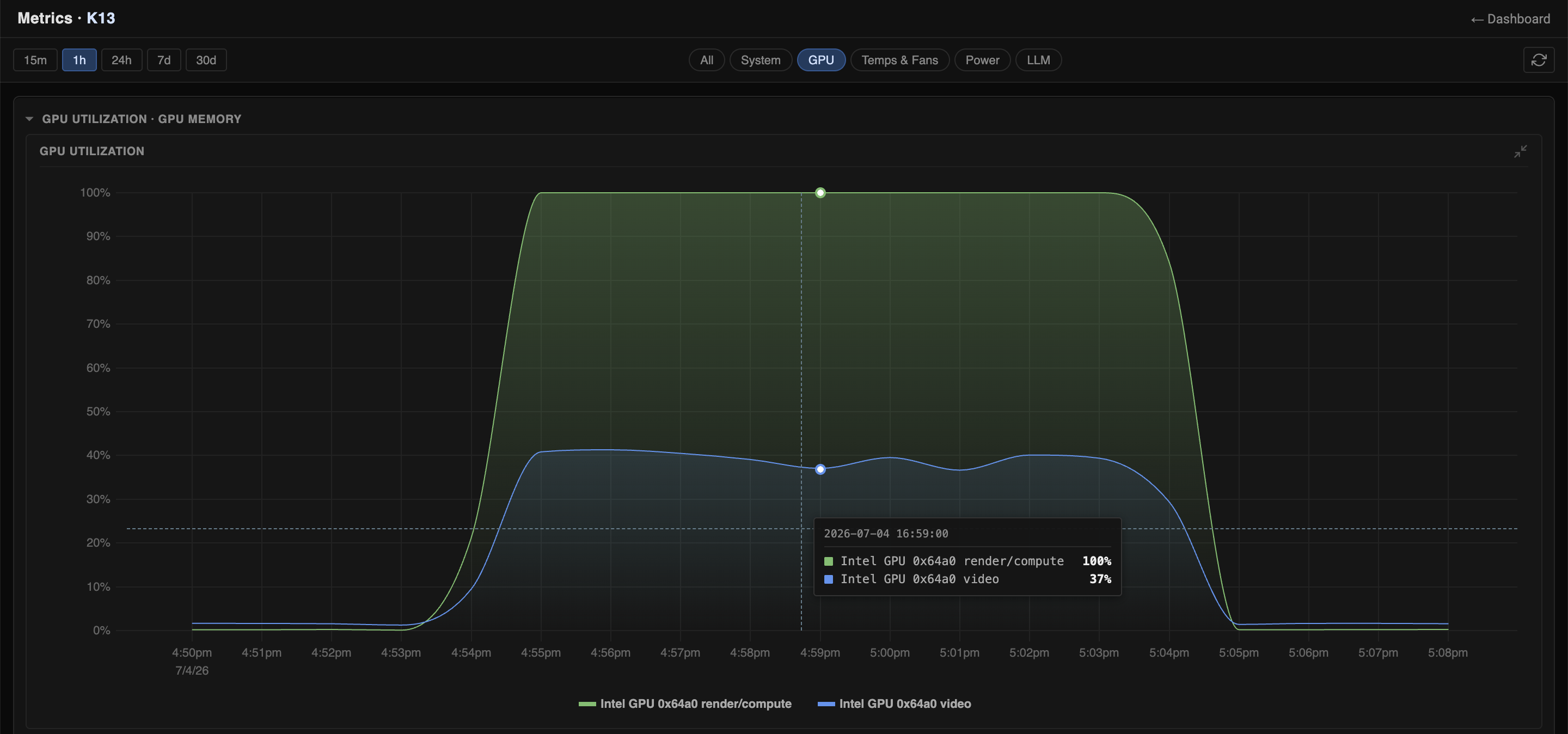
GPU utilization.
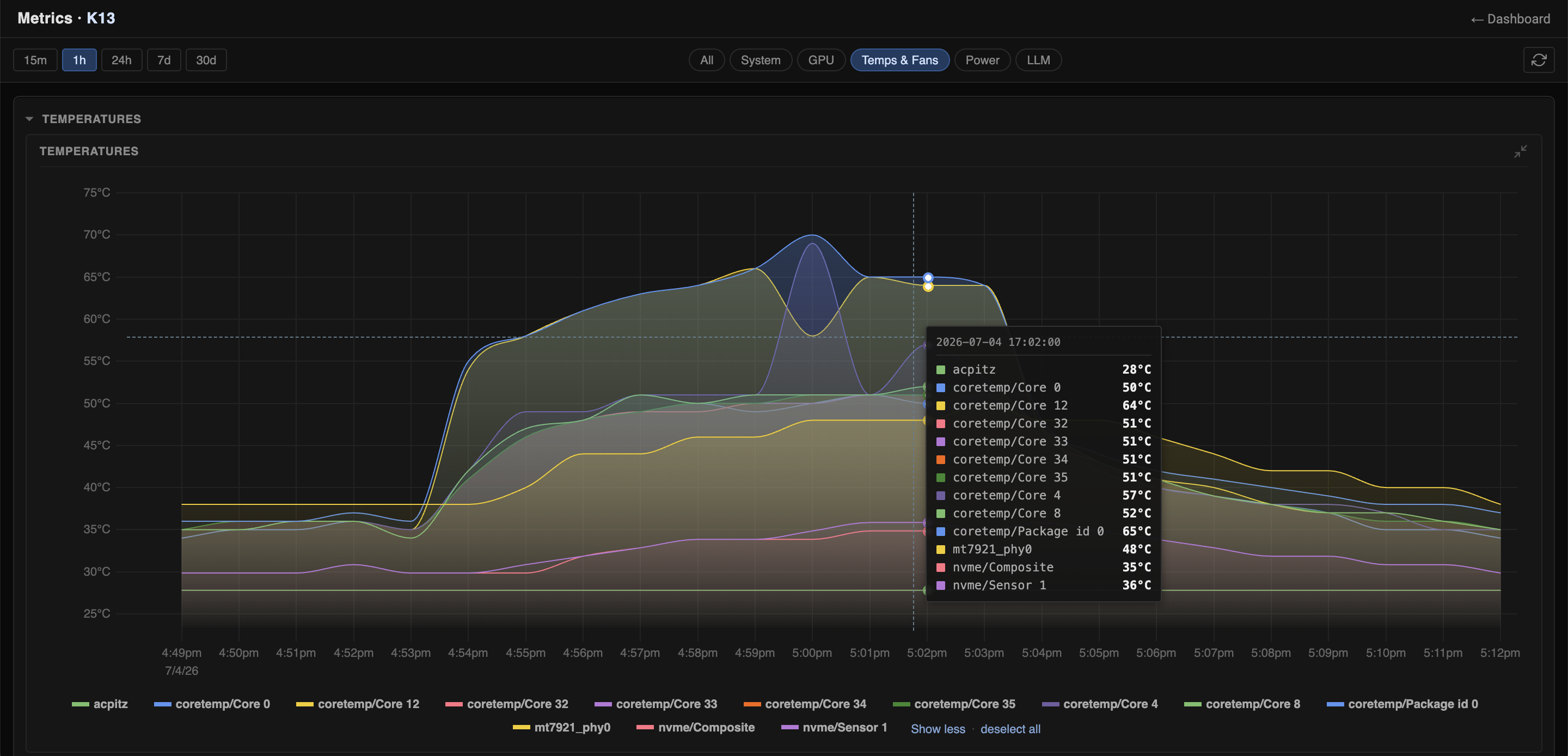
Temperature.
Intel Core Ultra NPU
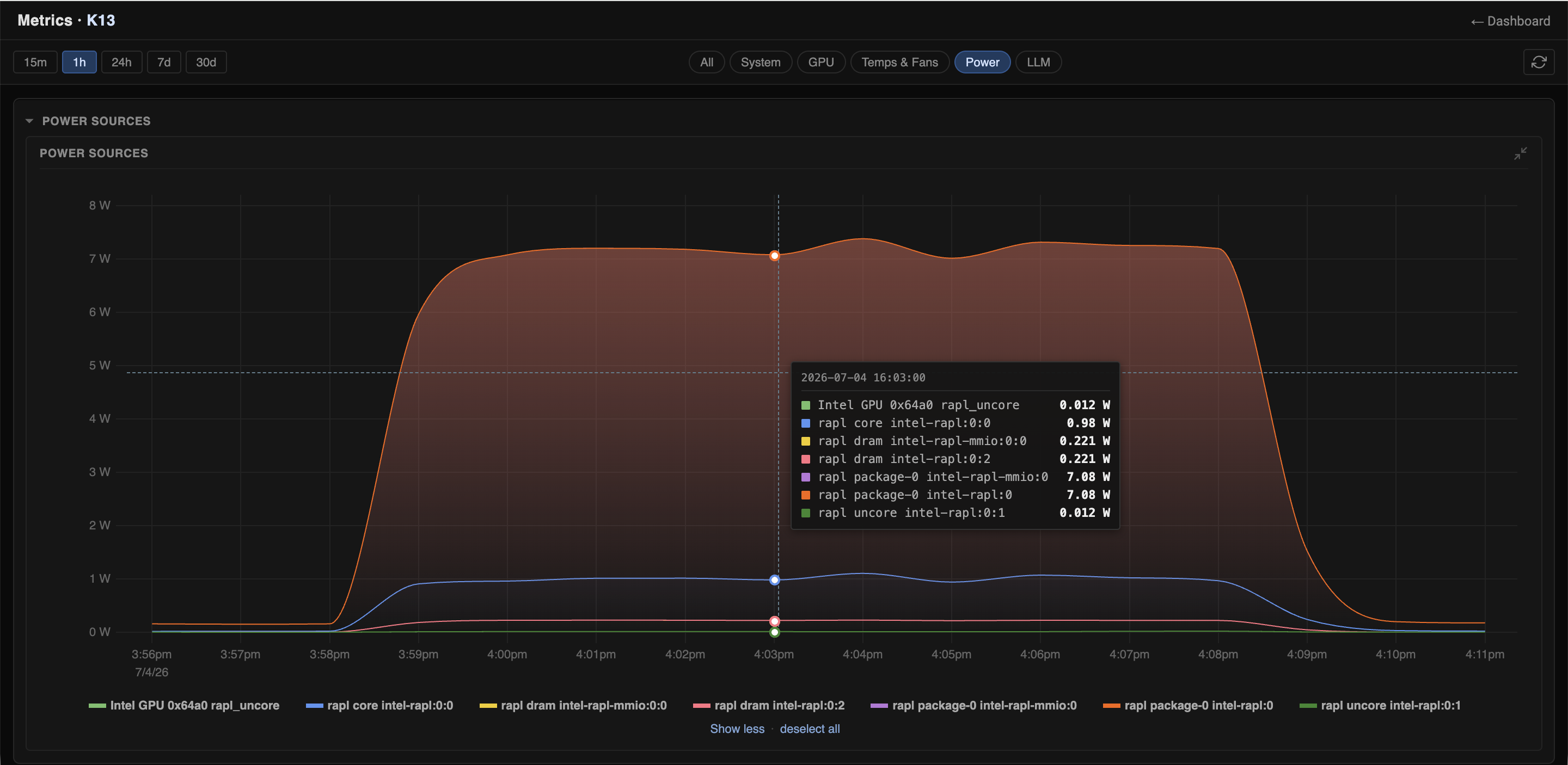
Software-reported power consumption.
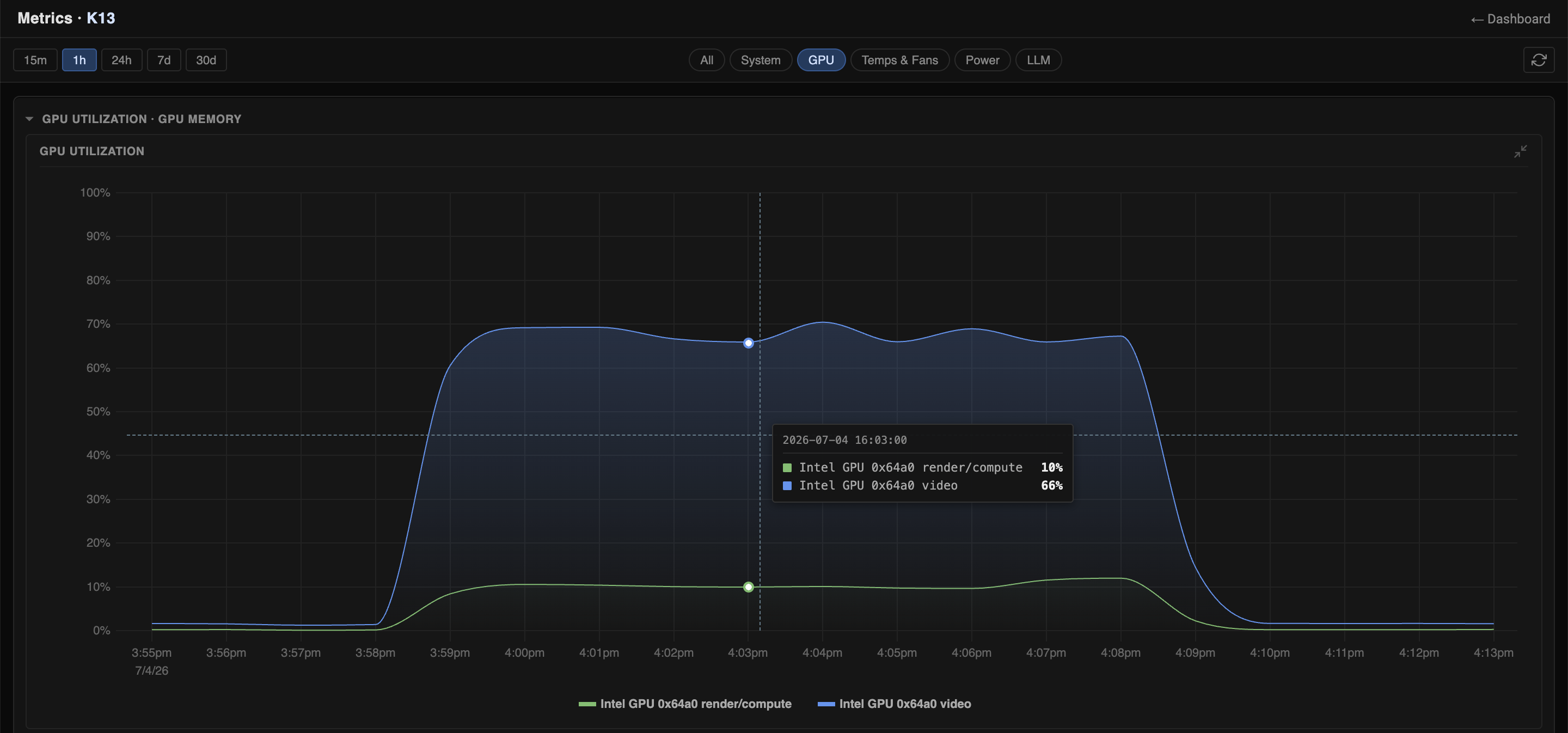
Accelerator utilization.
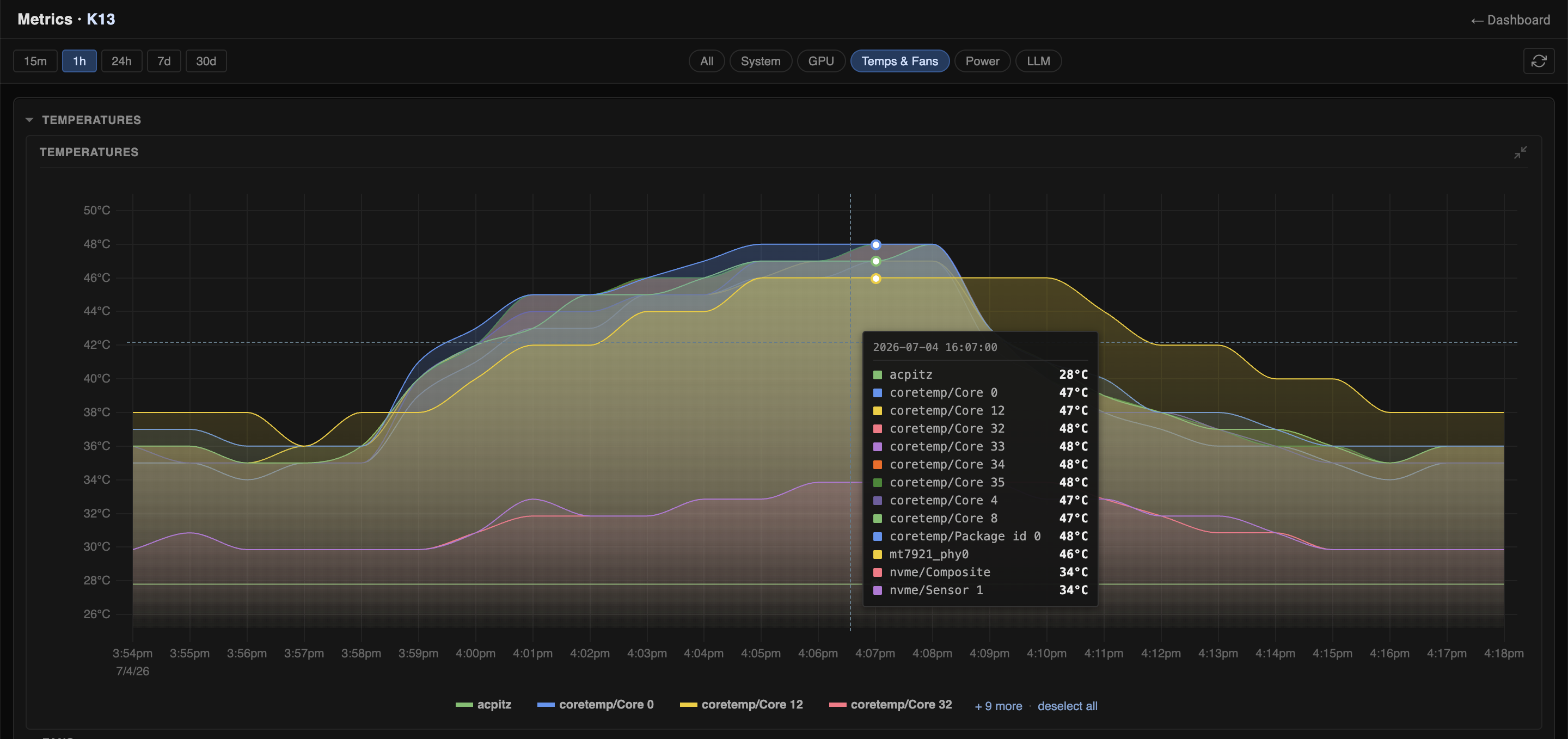
Temperature.
Detection Counts
The comparable 80,091-frame Intel NPU and Nvidia GPU runs produced identical person counts and near-identical car counts:
| Label | Intel NPU | Nvidia RTX 5060 Ti |
|---|---|---|
| car | 1,240,338 | 1,241,152 |
| person | 16,698 | 16,698 |
Sanity Check: Detection Counts
The VIRAT clip is a parking-lot scene with many parked vehicles, so the raw object count looks large at first glance. The benchmark counts every detection on every processed frame, not unique physical objects across time.
For the 10-minute run:
car detections: 1,240,338
frames: 80,091
cars per frame: 1,240,338 / 80,091 = 15.49
Representative frame from 101 seconds into the clip:
Raw representative frame.
We also added boxes from the Intel NPU run to sanity-check that the reported detections line up with visible people and vehicles in the scene.
Intel NPU detections at 101 seconds: 14 cars, 1 person, and 1 truck.
Visually, this frame contains roughly 25-30 visible vehicles, but many are small, partially occluded, at the image edge, under trees, or classified as trucks. Because the full 1920x1080 frame is resized to the detector input shape of 320x320, an average of about 15-17 detected vehicles per frame is plausible.
The benchmark also reports total detections per frame between 12 and 20 for this run, which matches the scene density.
Interpretation
The Nvidia GPU is the fastest single device in this benchmark, but only by about 8 percent over the Intel NPU. The power gap is much larger: the Intel NPU delivers about 11.1x better FPS/W in the measured configuration, which translates to about $269 per year in electricity cost savings for one always-on video AI workload.
The same efficiency advantage also matters for battery-powered autonomous robots and drones, where lower power draw can extend runtime or leave more energy budget for sensing, motion, and communication.
Known Gaps
We publish these numbers as reproducible measurements, not the final word. If you see a gap, mistake, or better comparison target, please send feedback so we can get closer to the truth together.
The main missing comparison is power-efficient edge AI hardware. Two useful next targets are:
| Target | Why it matters |
|---|---|
| Nvidia Jetson / Orin-class system | Compares Intel NPU against Nvidia hardware designed for edge AI, not a desktop GPU. |
| Newer Intel Core Ultra 9 or Core Ultra Series 3 system | Checks whether higher-end or newer Intel NPU/iGPU hardware changes the result. |