Reefy began as a solution to our own problem: a growing, diverse home lab that we wanted to run like a cloud instead of managing each machine by hand.
Setting all of that up on a regular distro like Ubuntu or Red Hat - drivers, updates, remote access, storage, backups, monitoring - is days of work even for an experienced sysadmin, and largely out of reach for everyone else. Reefy folds it all into the operating system, so any machine you own gets the cloud's operational ease.
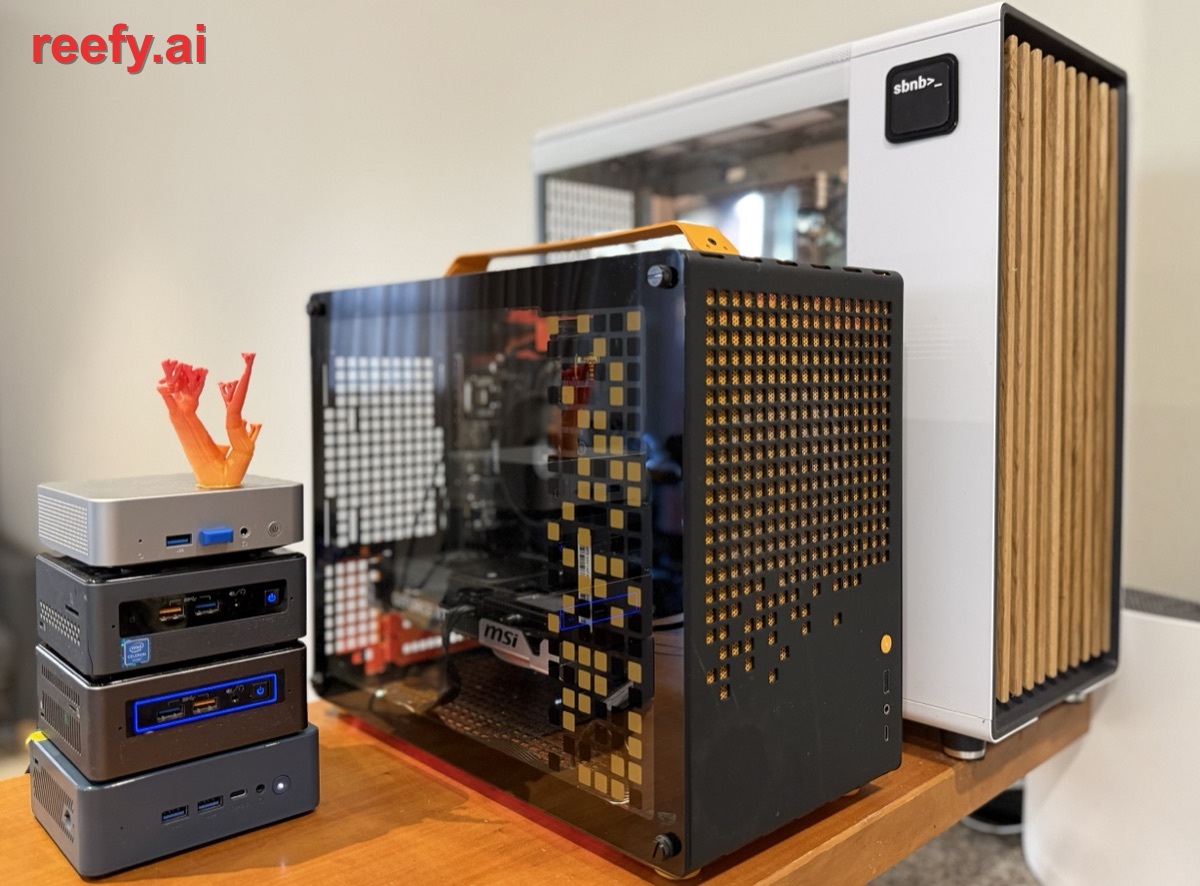
What is Reefy.ai?
At its core it is a Linux distribution, like Ubuntu or Red Hat, but built from first principles for one job: running AI workloads on bare metal with zero fuss - like Android for phones.
It is built entirely from source (with Buildroot): a mainline long-term-support kernel (Linux 6.18 LTS, maintained upstream into 2028), a systemd init, and a read-only SquashFS root - no package manager, no dpkg/rpm database, none of the decades of accumulated daemons and defaults nobody remembers turning on. What is left is just enough OS to bring up the hardware and start the Docker containers where your app actually lives.
Reefy takes care of everything below the container - the hardware, the kernel, storage, networking, updates. Your apps run on top.
Architecture at a glance
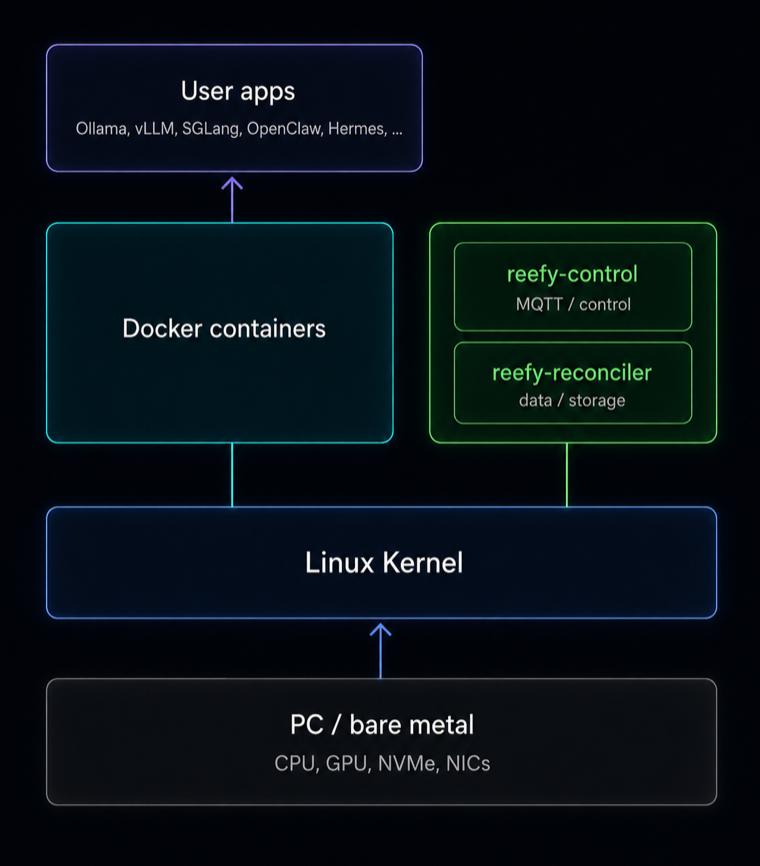
A Reefy device runs a deliberately small split of two privileged processes:
- Control plane (
reefy-control) - an MQTT-over-mTLS client. It receives the device's desired state from the cloud and reports status back. - Data plane (
reefy-reconciler) - owns storage (LUKS, LVM, filesystems) and turns desired state into a runningdocker composestack.
The control plane is kept deliberately simple and independent, and it comes
up immediately on boot - so you can see a machine's state and control it
even when something else has gone wrong. The data plane, meanwhile, keeps
your apps running from the last-applied state if the control link drops. The
unit of truth is a single desired-state.json, persisted on the device and
re-applied on every boot.
The Reefy OS security model documents the host, container, storage, and control-plane trust boundaries in more detail.
How Reefy compares to other Linux distros
A traditional Linux server is a sequence of manual steps - install distro, install drivers, configure Docker, wire up networking, expose services, set up monitoring and backups, then babysit updates. Reefy collapses that into: flash a USB, boot, adopt the device, start an app.
| Capability | Other distros | Reefy | Why it matters |
|---|---|---|---|
| OS install | ❌ | ✅ | Image any machine in minutes - nothing to set up per box |
| GPU drivers | ❌ | ✅ | GPU apps run out of the box - no driver / CUDA version hell |
| App deployment | ❌ | ✅ | Launch apps in one click instead of SSH + Docker wrangling |
| Remote access | ❌ | ✅ | Reach devices anywhere - no VPN, port-forwarding, or static IP |
| Updates | ❌ | ✅ | A bad update auto-rolls back; a remote box never bricks |
| Storage | ❌ | ✅ | Encrypted, snapshot-ready storage without the LVM / LUKS dance |
| Backups | ❌ | ✅ | Move to a new machine like restoring a phone |
| Monitoring | ❌ | ✅ | CPU / GPU / temps from first boot - no Grafana to stand up |
Here "other distros" means the usual do-it-yourself path: a general-purpose distro where each of these is your job to install, wire up, and maintain. The rest of this article is how Reefy delivers each of them instead.
Managed from anywhere, including your phone
Every Reefy device is managed from a web dashboard at reefy.ai - cloud-hosted, so it is always reachable and shows your whole fleet even when a device itself is offline.
The transport is MQTT, not a custom agent protocol. Browsers connect directly over MQTT-over-WebSocket (WSS) using a short-lived JWT minted per session, so the dashboard gets the same real-time device stream the backend does - status, metrics, and app lifecycle events arrive as they happen.
Remote shells and app web UIs ride Cloudflare named tunnels
(cloudflared on the device), so you reach a box at
<hostname>--ssh--<id>.reefy.ai without it having a public IP or an open
inbound port. The in-browser terminal runs over the same MQTT bridge. The
whole dashboard is responsive, so all of this works even from a phone while
you are on the go.
Works fully offline once configured
Remote management is a convenience, not a dependency.
Because the reconciler persists desired-state.json and the apps' container images
locally, a device boots and brings its entire stack back up from local
images - no network required. MQTT connects asynchronously afterward; apps
never wait on the cloud to start. Saved network configuration (including
static IPs) is re-applied on boot by the same reconcile path. The result
is a device that runs unattended in fully offline or air-gapped
environments, and simply syncs with the dashboard - including firmware
(OS) upgrades - whenever it can reach it.
On the local network the device needs no cloud at all to reach: it
advertises itself over mDNS as <name>.local, and serves a small page on
port 80 with its own CA certificate to download and trust. Install that CA
once and you get authenticated HTTPS to the device and its apps across the
LAN - completely offline.
A boot path engineered for bare metal
Reefy boots through a Unified Kernel Image (UKI) - the entire OS packed into a single EFI binary.
The kernel, initramfs, kernel command line, and OS-release metadata are
bundled into that one binary via systemd's linuxx64.efi.stub. One file,
assembled with objcopy, is the entire bootable OS. This removes the fragile
multi-file bootloader-plus-config setups that plague traditional distros
and gives a clean, measurable boot artifact. Build flavors (production vs.
a verbose dev shell) differ only in the baked-in .cmdline section; the
kernel and rootfs are identical.
Bundling the whole OS into one EFI binary also makes it the natural unit for Secure Boot: there is a single artifact to sign and measure rather than a kernel, initramfs, and command line that each need covering independently. The image is signing-ready, so hardening the boot chain further - signed UKIs with enrolled keys, and TPM-measured boot - is a direct path from here rather than a re-architecture.
Boot and run from a USB dongle
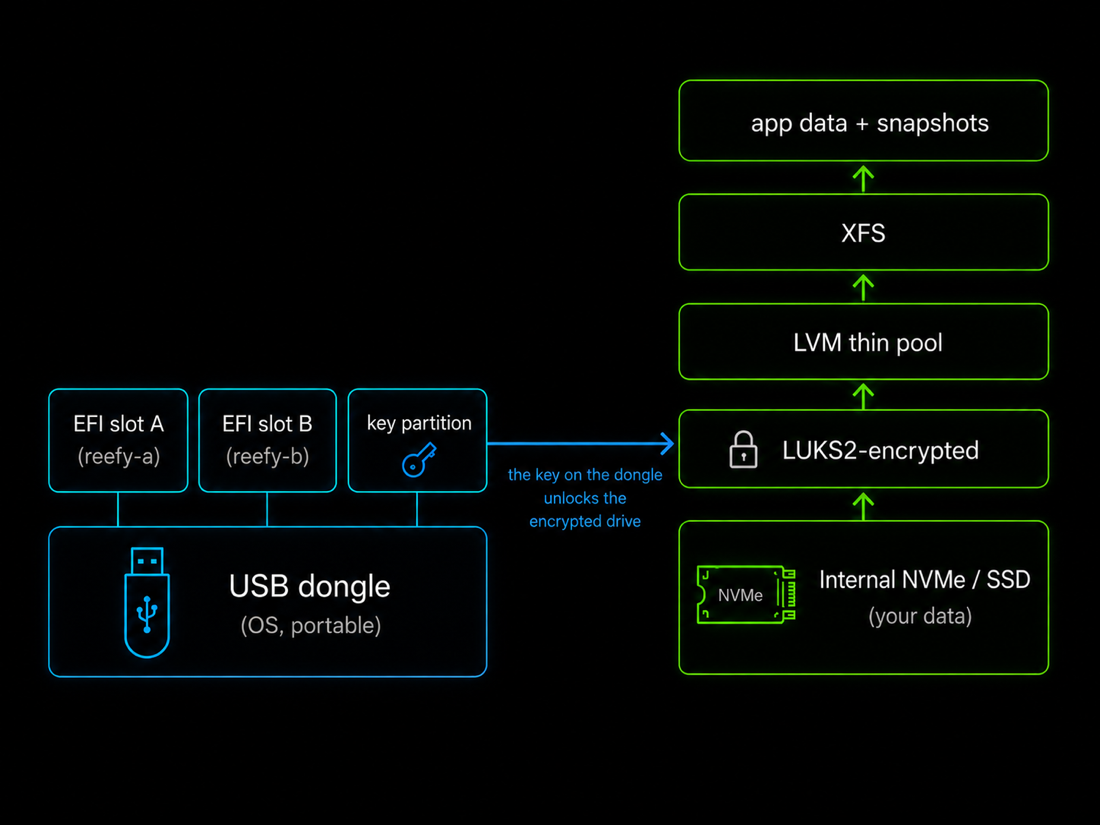
Reefy boots and runs from a USB stick - a surprisingly optimal way to run bare metal, though it runs just as well flashed to an internal drive.
The dongle has real upsides. It carries a GPT layout of two EFI System
Partitions (the A/B slots, reefy-a / reefy-b) and a tiny raw key
partition (a data partition is added only when a device is adopted to run
entirely from the dongle). Because the OS lives on the stick, the
machine's internal NVMe/SSD is left entirely for your encrypted data, the
OS is trivially portable between machines, and re-imaging or recovering a
box is as simple as swapping a stick.
A/B updates, like mission-critical hardware
OS updates use an A/B slot scheme - the new OS goes to the spare slot, is tried, and rolls back automatically if it misbehaves.
The reefy-efi updater fully recreates the inactive slot - it is reformatted
from scratch on every update, so any residual filesystem damage on that
partition is wiped and recovered automatically - then writes the new UKI
there and sets the UEFI BootNext variable as a one-shot to try it.
The safety net is health-gated, not blind: after a switched boot, the
system waits for storage and the control plane to actually come up healthy
and only then commits the new slot to BootOrder. If they do not, the
machine reboots and UEFI falls straight back to the previous, known-good
slot. There is a second, lower-level net too: a hardware watchdog (pinged
by systemd through /dev/watchdog) is armed across the update, so even if
the new kernel hangs completely - never even reaching the health check -
the watchdog resets the box and UEFI falls back. The system is designed so
that a failed update should not brick the machine.
This approach was inspired by the fault-tolerant update systems used in projects like SpaceX's Starlink satellites, where a failed remote update simply is not an option. For the curious, Starlink's paper on over-the-air updates covers the same problem at the scale of thousands of satellites - over the vacuum, in their case.

Encryption on by default
User data encryption is on from first boot - not an option you remember to enable.
Data partitions are LUKS2 with AES-256-XTS, and when a device runs from a dongle the encryption key lives on the dongle itself.
That has an unexpected upside: pull the stick - and with it the key - and the internal drives are unreadable ciphertext. There is no wipe step and no waiting - a machine can be safely handed to another owner, returned, or decommissioned the moment the dongle is removed.
See the Reefy OS security model for the guarantees and limits of encryption at rest, immutable firmware, and recoverable A/B updates.
A storage stack tuned for AI data and backups
On internal drives the data path is LUKS2 -> LVM thin pool -> XFS - encrypted, with instant snapshots for backups.
A single volume group (reefy) hosts a thin pool (reefy_pool) from which
per-app thin volumes are carved. Thin provisioning gives us instant,
space-efficient snapshots, which is exactly what makes consistent
backups possible without taking apps offline.
Two choices in that stack come straight from benchmarking rather than folklore:
- XFS over ext4, to avoid ext4's inode tax - tens of gigabytes of inode tables pre-allocated on a large pool, versus near-zero for XFS.
- A 512 KiB thin-pool chunk size, for far better space reclaim under fragmented deletes (XFS reclaimed ~73% of freed space at 512 KiB versus ~7% at 4 MiB), at no throughput cost.
We benchmarked the stack on one of the fastest NVMe drives available (a PCIe 4.0 Samsung 990 EVO Plus, rated 7.25 / 6.3 GB/s) and confirmed that sequential read and write are essentially unaffected by the encryption + LVM + XFS layers. Full methodology and numbers are in the storage benchmark study.
Cloud backup and painless migration
Reefy backs selected app-data folders up to the cloud with Borg - deduplicated and encrypted before they leave the device.
It uses one encrypted repository per user and per-instance append-only SSH keys for access control. The reconciler takes an LVM thin snapshot first, so the archive is point-in-time consistent even while the app keeps writing.
The payoff is that moving to a new machine feels like migrating to a new iPhone: bring up a fresh Reefy box, point an app instance at an existing archive, and the reconciler runs the restore as part of applying desired state. Your app comes back with the same data and state. Hardware becomes disposable; your setup does not - so a failed machine is replaced in minutes rather than painstakingly recovered. That matters most with consumer-grade hardware and across larger fleets, where something is always failing somewhere.
GPUs that just work
Nvidia support is built into the OS - drivers, CUDA, and firmware ship in the image.
Reefy tracks the latest stable drivers: the GPU kernel module, GSP firmware, and CUDA userspace all ship in the build. At boot, Reefy generates a Container Device Interface (CDI) spec for the GPU - the modern way to expose accelerators to containers, which replaces the older Nvidia container runtime.
Apps do not deal with any of this. An app simply declares that it wants a GPU, and Reefy attaches the device, libraries, and mounts automatically whenever the machine has one. No driver-version roulette, no manual runtime surgery.
Built-in monitoring, from the first boot
Monitoring in the spirit of Grafana, there the instant you boot - nothing to install or wire up.
Devices push
metrics over MQTT (Prometheus-style reefy_* names with labels - so disk
and network are reported per-mount and per-interface); the backend ingests
them into a TimescaleDB time-series store, with rollups that keep
multi-day dashboard queries fast.
CPU, GPU, memory, disk, network, fan speeds, and temperatures are all visible immediately. For custom-built PCs the fan and temperature series are genuinely useful for judging how well your cooling actually holds up under load - and the one-click Bench app (sysbench, fio, gpu-fryer) lets you put the hardware under that load on purpose.
Estimated cloud savings
Reefy turns the hardware you already own into a number you can point at.
The dashboard continuously estimates what the same machine would cost as a cloud VPS and accumulates the savings against its actual uptime.
The estimate uses a fixed shared-cloud comparison rate card. Your CPU, RAM, and disk are matched down to a published tier, and each completed online hour credits its share. It is a transparent capacity comparison, not a cloud quote or total-cost-of-ownership calculation.
See the comparison rate card, formula, and exclusions.
The App Catalog
A catalog of popular open-source apps that install in one click - and you can package and publish your own.
Reefy's catalog spans inference servers, AI agents, dev environments, and media and home apps. Either way, the hard parts of bare metal (boot, storage, encryption, GPUs, networking, updates) are already solved underneath, so an app is just a container plus a manifest.
Starting one is a single click: the dashboard turns the app's manifest into a container service - storage carved from the thin pool, environment injected, GPU attached when present, and a public HTTPS route provisioned - and pushes it to the device to bring up.
That public route is a feature in itself. Every app you start is reachable
from anywhere instantly: its ports are published through a Cloudflare named
tunnel, so there is no port forwarding, no firewall holes, and no public
IP - the app is fronted at a *.reefy.ai URL with TLS and short-lived
access tokens. Think of it like Tailscale Funnel for exposing a service
port, except it works out of the box with zero setup.
A few examples from the catalog:
- Inference servers - Ollama, vLLM, SGLang. Because the Nvidia stack is wired all the way through to CDI, these run on the GPU with no setup.
- AI agents - OpenClaw and Hermes. Same one-click start. And because Reefy backs up app data, your agent comes back exactly the same on another machine.
- And much more - Frigate (video / NVR), Gitea, code-server, full Ubuntu and Fedora dev environments, and others.
Development environments
Ubuntu and Fedora dev environments are full distros - first-class Reefy apps you can run several at once on one box.
Each is a full, real distro - systemd and all - with full access to the host hardware, including KVM, so you can spin up virtual machines inside them. That means several independent Ubuntu or Fedora environments can run on a single Reefy PC at once - genuinely handy for development and experimentation.
A unified LLM proxy and router
Reefy includes an OpenAI-compatible LLM gateway that owns provider credentials and token refresh, so your apps don't have to.
Reefy includes this proxy and router out of the box (reefy-llm-proxy). It
owns provider credentials and the OAuth
token-refresh lifecycle, so individual apps stop reinventing that
plumbing: they point OPENAI_BASE_URL at the local proxy, use a standard
OpenAI client, and let Reefy handle refresh and routing. Credentials stay
on the device and are never synced back to the cloud. More detail in the
reefy-llm-proxy repo.
Liveness monitoring and alerts
Reefy watches every device and emails you the moment one drops offline - or comes back.
Device up/down is detected through MQTT's Last-Will-Testament: when a device's connection drops, the broker publishes its offline status, the backend marks it down and emails the admin (with a stale-online scrub as defense in depth, and a back-online email when it returns). You always know the state of your fleet without watching it.
What hardware is supported?
Just about any x86-64 machine today, with ARM on the roadmap.
Reefy is deliberately agnostic to hardware configuration: the same image boots a 2-core Celeron with 4 GB of RAM and a 128-core datacenter server, and scales the storage, GPU, and app stack to whatever it finds. A mini-PC, an old laptop, a custom build, a rack server - they all run Reefy.
We're at the beginning
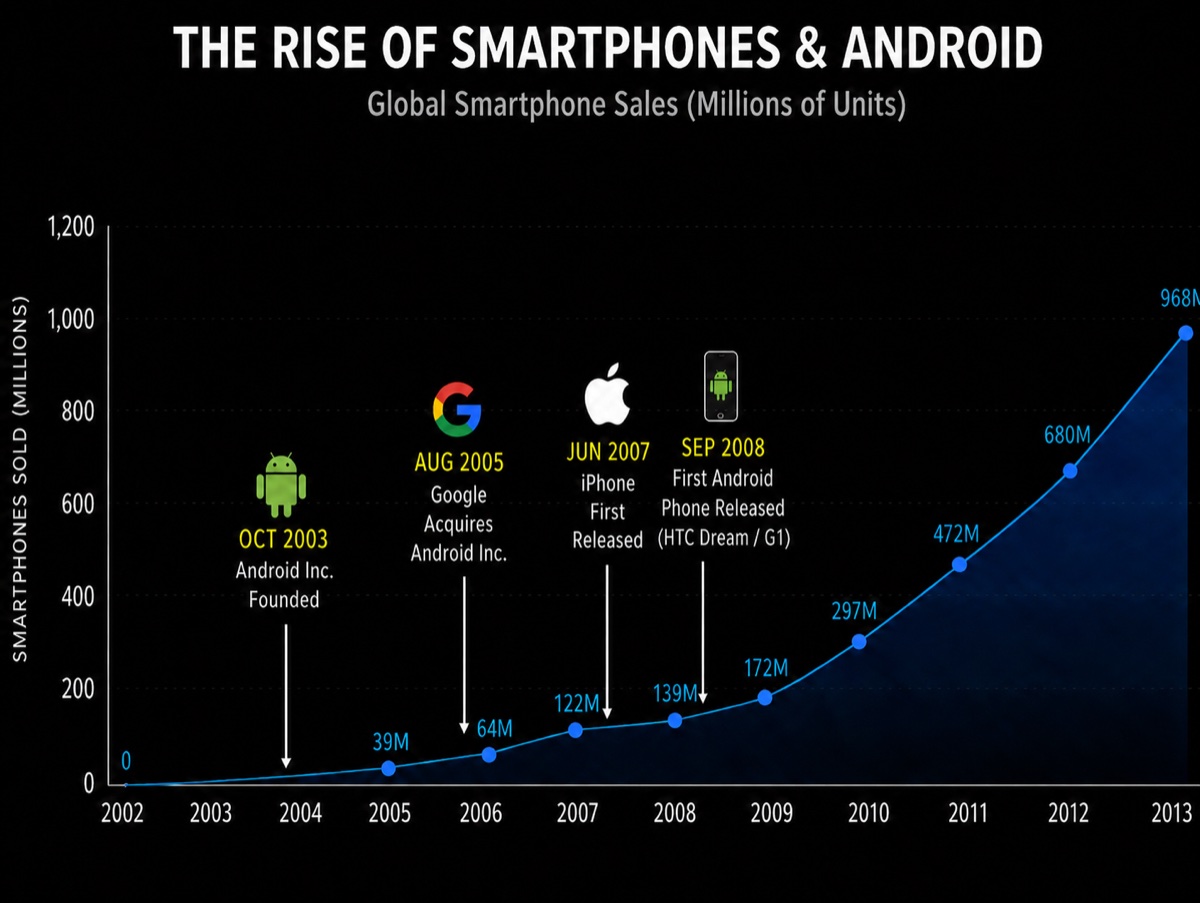
AI computers today are where smartphones were around 2003 - the platform is just forming, and the OS for it is still being created.
Android turned commodity hardware into a phone platform, and the market went from tens of millions of units to roughly a billion within a decade. AI computers are at that same early inflection - and Reefy is here to power them.
A reef, not a cloud
Reefy is a new concept, like the cloud - but on hardware you own.

The cloud was a genuinely new idea: stop hand-tending servers like pets and treat compute as a uniform, declarative, API-driven utility - cattle, not pets. The trade-off is that it lives in someone else's datacenter, with your data and your compute off-prem.
Reefy brings that same modern model to hardware you own and keep close. Your machines are described by desired state, not configured by hand; they are reproducible and disposable (lose one, restore onto another like migrating to a new phone); and they are all managed from a single dashboard. The old sysadmin-per-box ritual is gone - but the box is still yours, on your desk or in your rack.
And to be clear: we love the cloud, and it is not going anywhere. Reefy is not a replacement so much as a third option. That is the whole metaphor - clouds are vast, white, uniform, and far away; a reef is colorful, diverse, alive, and close to home. Reefy is on-prem compute run the modern way: your own diverse hardware, managed like a cloud, right where you are.
The apps are yours; Reefy makes the metal disappear.
Open source
Reefy OS is developed in the open. Browse the firmware, the storage benchmark study, and more at github.com/reefyai/reefy.
Try Reefy
Getting a machine onto Reefy is short: sign in at reefy.ai, flash the personalized image to a USB stick, boot, and adopt the device in the dashboard.